---
license: apache-2.0
base_model:
- lllyasviel/FramePackI2V_HY
pipeline_tag: text-to-image
---
# Animetic Light
[ ](./assets/images/main_image.webp)
[](README_ja.md)
[](README.md)
An experimental model for background generation and relighting targeting anime-style images.
This is a LoRA compatible with FramePack's 1-frame inference.
For photographic relighting, IC-Light V2 is recommended.
- [IC-Light V2 (Flux-based IC-Light models) · lllyasviel IC-Light · Discussion #98](https://github.com/lllyasviel/IC-Light/discussions/98)
- [IC-Light V2-Vary · lllyasviel IC-Light · Discussion #109](https://github.com/lllyasviel/IC-Light/discussions/109)
IC-Light V2-Vary is available on Hugging Face Spaces, while IC-Light V2 can be used via API on platforms like fal.ai.
- [fal-ai/iclight-v2](https://fal.ai/models/fal-ai/iclight-v2)
## Features
- Generates backgrounds based on prompts and performs relighting while preserving the character region.
## Generation Examples
[
](./assets/images/main_image.webp)
[](README_ja.md)
[](README.md)
An experimental model for background generation and relighting targeting anime-style images.
This is a LoRA compatible with FramePack's 1-frame inference.
For photographic relighting, IC-Light V2 is recommended.
- [IC-Light V2 (Flux-based IC-Light models) · lllyasviel IC-Light · Discussion #98](https://github.com/lllyasviel/IC-Light/discussions/98)
- [IC-Light V2-Vary · lllyasviel IC-Light · Discussion #109](https://github.com/lllyasviel/IC-Light/discussions/109)
IC-Light V2-Vary is available on Hugging Face Spaces, while IC-Light V2 can be used via API on platforms like fal.ai.
- [fal-ai/iclight-v2](https://fal.ai/models/fal-ai/iclight-v2)
## Features
- Generates backgrounds based on prompts and performs relighting while preserving the character region.
## Generation Examples
[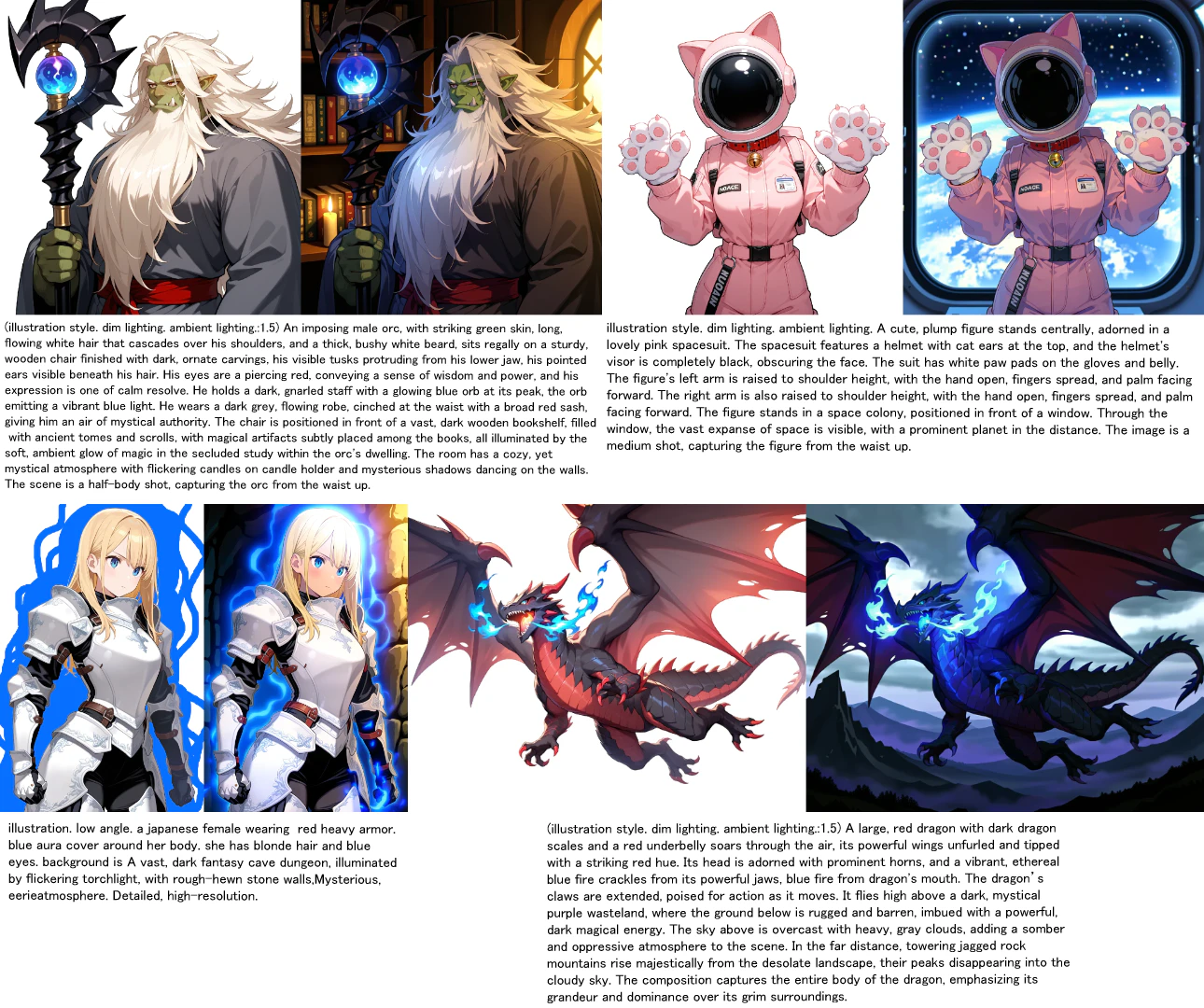 ](./assets/images/sample.webp)
## How to Use
- The recommended image resolution is approximately 1024x1024 total pixels.
- Prepare an image with a simple, flat background.
Even with an image that already has a background, roughly filling that background area with a single color may still work.
[
](./assets/images/sample.webp)
## How to Use
- The recommended image resolution is approximately 1024x1024 total pixels.
- Prepare an image with a simple, flat background.
Even with an image that already has a background, roughly filling that background area with a single color may still work.
[ ](./assets/images/erased_bg_sample.webp)
- Prompts are recommended to be created with Gemini Flash 2.5.
A prompt length of 700 characters or more (including spaces and line breaks) is recommended.
Prompts for Gemini Flash 2.5 to help with prompt generation are available [here](./prompt.txt).
By inputting an image and a brief description, a complete prompt will be output.
- Example 1: "A dragon flying while breathing blue fire. The background is a volcano."
- Example 2: "Volcano"
- Add the following tags to the beginning of your prompt:
`illustration style`, (optional: `ambient lighting`, `dim lighting`)
- Note: Unsupported image styles (e.g., figure-like) may result in noise or residual backgrounds.
### ComfyUI Workflow
Workflow file is [here](./workflows/workflow_animetic_light.json)
Sample image is [here](./sample_images/dragon.webp)
Please use [xhiroga/ComfyUI-FramePackWrapper_PlusOne](https://github.com/xhiroga/ComfyUI-FramePackWrapper_PlusOne).
For model installation instructions, please refer to the documentation for your respective inference environment.
Also, please place `animetic_light.safetensors` in the `ComfyUI/models/loras` directory.
## Resources
### FramePack
- [GitHub - lllyasviel/FramePack: Lets make video diffusion practical!](https://github.com/lllyasviel/FramePack)
### Inference Environments
- [GitHub - xhiroga/ComfyUI-FramePackWrapper_PlusOne](https://github.com/xhiroga/ComfyUI-FramePackWrapper_PlusOne)
- [GitHub - kijai/ComfyUI-FramePackWrapper](https://github.com/kijai/ComfyUI-FramePackWrapper)
- [GitHub - git-ai-code/FramePack-eichi](https://github.com/git-ai-code/FramePack-eichi)
### Training Environments
- [GitHub - kohya-ss/musubi-tuner](https://github.com/kohya-ss/musubi-tuner)
- [musubi-tuner/docs/framepack_1f.md at main · kohya-ss/musubi-tuner](https://github.com/kohya-ss/musubi-tuner/blob/main/docs/framepack_1f.md)
---
[](https://x.com/ippanorc)
](./assets/images/erased_bg_sample.webp)
- Prompts are recommended to be created with Gemini Flash 2.5.
A prompt length of 700 characters or more (including spaces and line breaks) is recommended.
Prompts for Gemini Flash 2.5 to help with prompt generation are available [here](./prompt.txt).
By inputting an image and a brief description, a complete prompt will be output.
- Example 1: "A dragon flying while breathing blue fire. The background is a volcano."
- Example 2: "Volcano"
- Add the following tags to the beginning of your prompt:
`illustration style`, (optional: `ambient lighting`, `dim lighting`)
- Note: Unsupported image styles (e.g., figure-like) may result in noise or residual backgrounds.
### ComfyUI Workflow
Workflow file is [here](./workflows/workflow_animetic_light.json)
Sample image is [here](./sample_images/dragon.webp)
Please use [xhiroga/ComfyUI-FramePackWrapper_PlusOne](https://github.com/xhiroga/ComfyUI-FramePackWrapper_PlusOne).
For model installation instructions, please refer to the documentation for your respective inference environment.
Also, please place `animetic_light.safetensors` in the `ComfyUI/models/loras` directory.
## Resources
### FramePack
- [GitHub - lllyasviel/FramePack: Lets make video diffusion practical!](https://github.com/lllyasviel/FramePack)
### Inference Environments
- [GitHub - xhiroga/ComfyUI-FramePackWrapper_PlusOne](https://github.com/xhiroga/ComfyUI-FramePackWrapper_PlusOne)
- [GitHub - kijai/ComfyUI-FramePackWrapper](https://github.com/kijai/ComfyUI-FramePackWrapper)
- [GitHub - git-ai-code/FramePack-eichi](https://github.com/git-ai-code/FramePack-eichi)
### Training Environments
- [GitHub - kohya-ss/musubi-tuner](https://github.com/kohya-ss/musubi-tuner)
- [musubi-tuner/docs/framepack_1f.md at main · kohya-ss/musubi-tuner](https://github.com/kohya-ss/musubi-tuner/blob/main/docs/framepack_1f.md)
---
[](https://x.com/ippanorc)