


[ICCV 2025] DreamRelation: Relation-Centric Video Customization


Yujie Wei, Shiwei Zhang, Hangjie Yuan, Biao Gong, Longxiang Tang, Xiang Wang, Haonan Qiu, Hengjia Li, Shuai Tan, Yingya Zhang, Hongming Shan
Relational video customization refers to the creation of personalized videos that depict user-specified relations between two subjects, a crucial task for comprehending realworld visual content. While existing methods can personalize subject appearances and motions, they still struggle with complex relational video customization, where precise relational modeling and high generalization across subject categories are essential. The primary challenge arises from the intricate spatial arrangements, layout variations, and nuanced temporal dynamics inherent in relations; consequently, current models tend to overemphasize irrelevant visual details rather than capturing meaningful interactions.
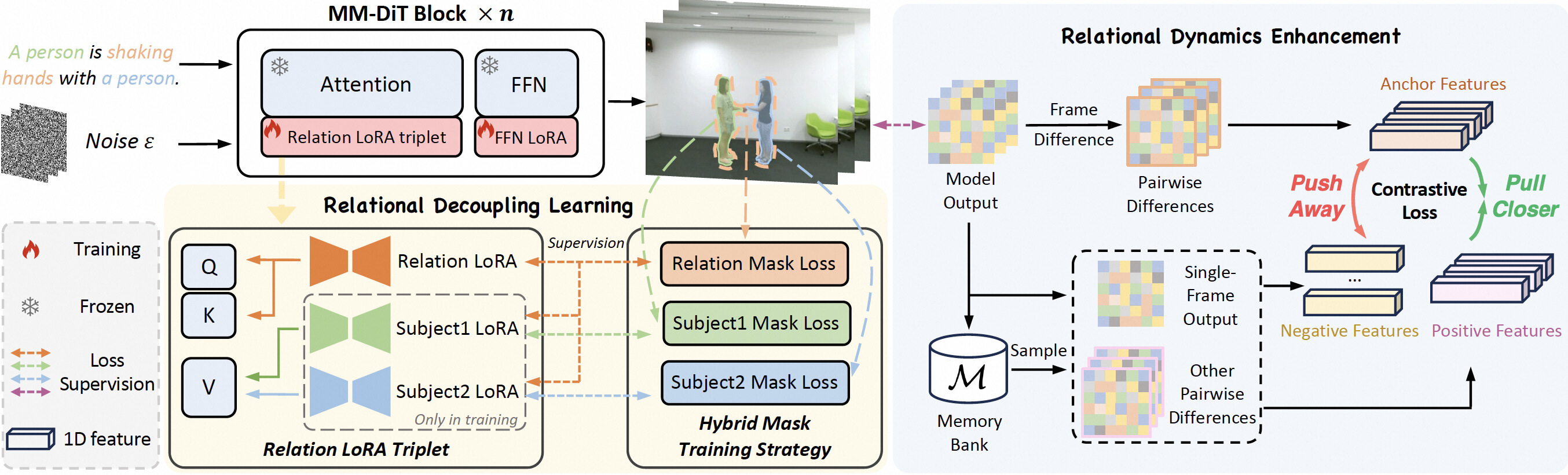
To address these challenges, we propose DreamRelation, a novel approach that personalizes relations through a small set of exemplar videos, leveraging two key components: Relational Decoupling Learning and Relational Dynamics Enhancement. First, in Relational Decoupling Learning, we disentangle relations from subject appearances using relation LoRA triplet and hybrid mask training strategy, ensuring better generalization across diverse relationships. Furthermore, we determine the optimal design of relation LoRA triplet by analyzing the distinct roles of the query, key, and value features within MM-DiT's attention mechanism, making DreamRelation the first relational video generation framework with explainable components. Second, in Relational Dynamics Enhancement, we introduce spacetime relational contrastive loss, which prioritizes relational dynamics while minimizing the reliance on detailed subject appearances. Extensive experiments demonstrate that DreamRelation outperforms state-of-the-art methods in relational video customization.
Installation
1. Prepare Environment and Pretrained Models
Follow the official installation instructions for Mochi 1 to set up your environment and download the necessary pretrained models. You can find the guide here: Mochi 1 Official Repository.
2. Place Mochi 1 Checkpoints
Move the downloaded Mochi 1 pretrained checkpoints into the pretrained_models/mochi directory.
3. Place T5 Checkpoints
Move the downloaded T5 pretrained checkpoints into the pretrained_models/t5-v1_1-xxl directory.
Examples
1. Download Pre-trained Models
We provide pre-trained LoRA models for the high-five and shaking hands relations to help you get started. You can download them from either ModelScope or Hugging Face Hub.
Download from ModelScope
pip install modelscope==1.23.0
modelscope download --model weilllllls/DreamRelation --local_dir checkpoints
Download from Hugging Face
pip install -U huggingface_hub
huggingface-cli download --resume-download weilllllls/DreamRelation --local-dir checkpoints
2. Run Example Command
# shaking hands
CUDA_VISIBLE_DEVICES=0 python demos/cli.py \
    --model_dir pretrain_models_ckpt/mochi-1-preview/ \
    --lora_path checkpoints/examples/shaking_hands/model_2000.lora.pt \
    --num_frames 61 \
    --cpu_offload \
    --prompt "A bear is shaking hands with a raccoon in a meadow." \
    --seed 522 \
    --train_cfg_path demos/fine_tuner/configs/shaking_hands/example.yaml \
    --test_lora_names relation

# high-five
CUDA_VISIBLE_DEVICES=0 python demos/cli.py \
    --model_dir pretrain_models_ckpt/mochi-1-preview/ \
    --lora_path checkpoints/examples/high-five/model_1800.lora.pt \
    --num_frames 61 \
    --cpu_offload \
    --prompt "A real-world bear is high-fiving with a real-world raccoon in a serene forest clearing." \
    --seed 1832 \
    --train_cfg_path demos/fine_tuner/configs/high-five/example.yaml \
    --test_lora_names relation
Training
1. Prepare Dataset
The training videos are sourced from the NTU RGB+D dataset. Due to the dataset's usage policy, we cannot directly provide the NTU RGB+D relational videos. Please apply for authorization to the NTU RGB+D dataset yourself and download the relevant relational videos. The names of all 26 relation types and their corresponding captions are provided in Table 8 of our paper.
Once the training videos are prepared, randomly select 20–30 videos for each relation and place them under videos/NTU_RGB_D.
For each video, also create a text file with the same name to contain the video's caption.
For example, for one A58: shaking hands video S001C001P001R001A058_rgb.mp4, place it under videos/NTU_RGB_D/A58-shaking_hands and create S001C001P001R001A058_rgb.txt, writing the caption "A person is shaking hands with a person." into the file.
2. Preprocess Videos
First, install bc if you don't have it:
sudo apt-get update
sudo apt-get install bc
Then, preprocess your videos using the script:
bash demos/fine_tuner/preprocess.bash -v videos/NTU_RGB_D/A58-shaking_hands/ -o videos_prepared/NTU_RGB_D/A58-shaking_hands/ -w pretrain_models_ckpt/mochi-1-preview --num_frames 61
You can adjust the --num_frames flag to specify the number of frames to extract for each video.
3. Prepare Video Masks
Generate masks for your videos using either Grounded-SAM or SAM 2.
We have provided the example masks of one video in videos/NTU_RGB_D/A58-shaking_hands_masks.
4. Start Training
CUDA_VISIBLE_DEVICES=0 COMPILE_DIT=1 python demos/fine_tuner/train.py --config-path demos/fine_tuner/configs/shaking_hands/example.yaml
Training Tips:
- Generally,
1800 to 2400training steps are sufficient. However, we recommend adjusting the training steps based on different relations to achieve optimal results. - Default hyperparameters are in
demos/fine_tuner/configs/high-five/example.yaml. For various relations, adjusttotal_positive_numsandtotal_negative_numsin relational contrastive learning for better results. - A GPU with 80 GB VRAM is recommended for training. If you have limited VRAM, you can reduce the number of frames in the
Preprocess Videosstep. The default number of frames for training is 61. - The current code primarily supports training with a batch size of 1. If you intend to use a batch size greater than 1, careful code review and modifications will be necessary.
Inference
To run inference using a trained LoRA model:
CUDA_VISIBLE_DEVICES=0 python demos/cli.py \
    --model_dir pretrain_models_ckpt/mochi-1-preview/ \
    --lora_path finetunes/example/NTU_RGB_D/A58-shaking_hands/model_2000.lora.pt \
    --num_frames 61 \
    --cpu_offload \
    --prompt "A bear is shaking hands with a raccoon in a meadow." \
    --seed 522 \
    --train_cfg_path demos/fine_tuner/configs/shaking_hands/example.yaml \
    --test_lora_names relation
Acknowledgement
This code is built on top of Mochi 1. We thank the authors for their great work.
Citation
If you find this code useful for your research, please cite our paper:
@article{wei2025dreamrelation,
  title={Dreamrelation: Relation-centric video customization},
  author={Wei, Yujie and Zhang, Shiwei and Yuan, Hangjie and Gong, Biao and Tang, Longxiang and Wang, Xiang and Qiu, Haonan and Li, Hengjia and Tan, Shuai and Zhang, Yingya and others},
  journal={arXiv preprint arXiv:2503.07602},
  year={2025}
}